

source: fanclub_kfroseth
source: fanclub_kfroseth
Well, this is kinda the continued that I’d like to see xD


BE FREE MY ART
THIS IS ADORABLE!!!!!!!!!!
↳darkiplier moodboard(s): hellfire
it’s not my fault if in God’s plan, he made the devil so much stronger than a man
Can we get a thread going of dark skinned girls and their favorite selfies/gifs?👀
if we’re not going to genuinely be here for us, who will? 🗣
I loooove being chocolate so much lol
Wow yall fine frfr! 😍😩
precious nervous baby boi
In this tutorial we’ll teach you how to make a copy of your Tumblr blog onto WordPress.com to act as a backup, or maybe just to say ‘thank u, next’ to Verizon’s Tumblr.
The first two steps don’t need to be followed if you already use WordPress.com.
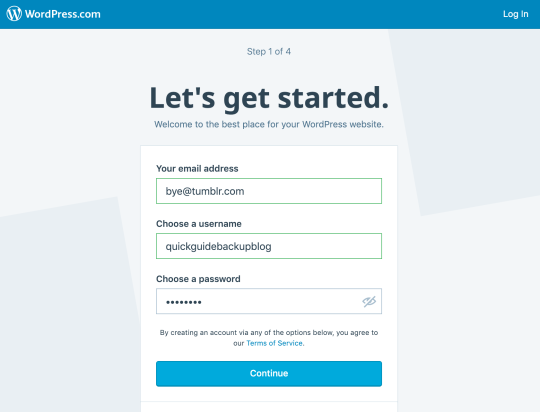
1. Sign up for a WordPress.com account
You need a WordPress.com blog, simply follow the steps to select your username and confirm your account via email.
Be sure to choose a free domain and free plan for now.
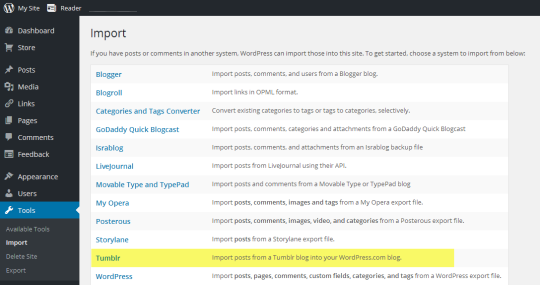
2. Open WordPress Admin
Click on Import
Click on Other importers.
3. Select import from Tumblr
4. Allow Tumblr access
Click the ‘Connect to Tumblr to begin’ button. You may need to log into Tumblr if you haven’t already. Be sure to allow access to WordPress.com
5. Start the import!
Once authenticated you can select your Tumblr blog from the list of your blogs and click on ‘Import this blog’.
And you’re done, WordPress.com takes care of the rest and will create a copy of your posts onto your WordPress.com blog.















 ladywriter94